Asterisk Integration — Developer Guide
Comprehensive technical documentation for the Asterisk PBX voice AI integration in the
InComIT Solution customer support system. This guide covers architecture, protocols,
services, configuration, and deployment.
Last updated: January 2025 |
Platform: .NET 10, Blazor Server |
Branch: with_incom_cloud
1. Architecture Overview
The system integrates Asterisk PBX with a Blazor Server application to provide AI-powered voice customer support. When a customer calls the Asterisk PBX, the call is routed to our application which handles real-time speech processing.
High-Level Architecture
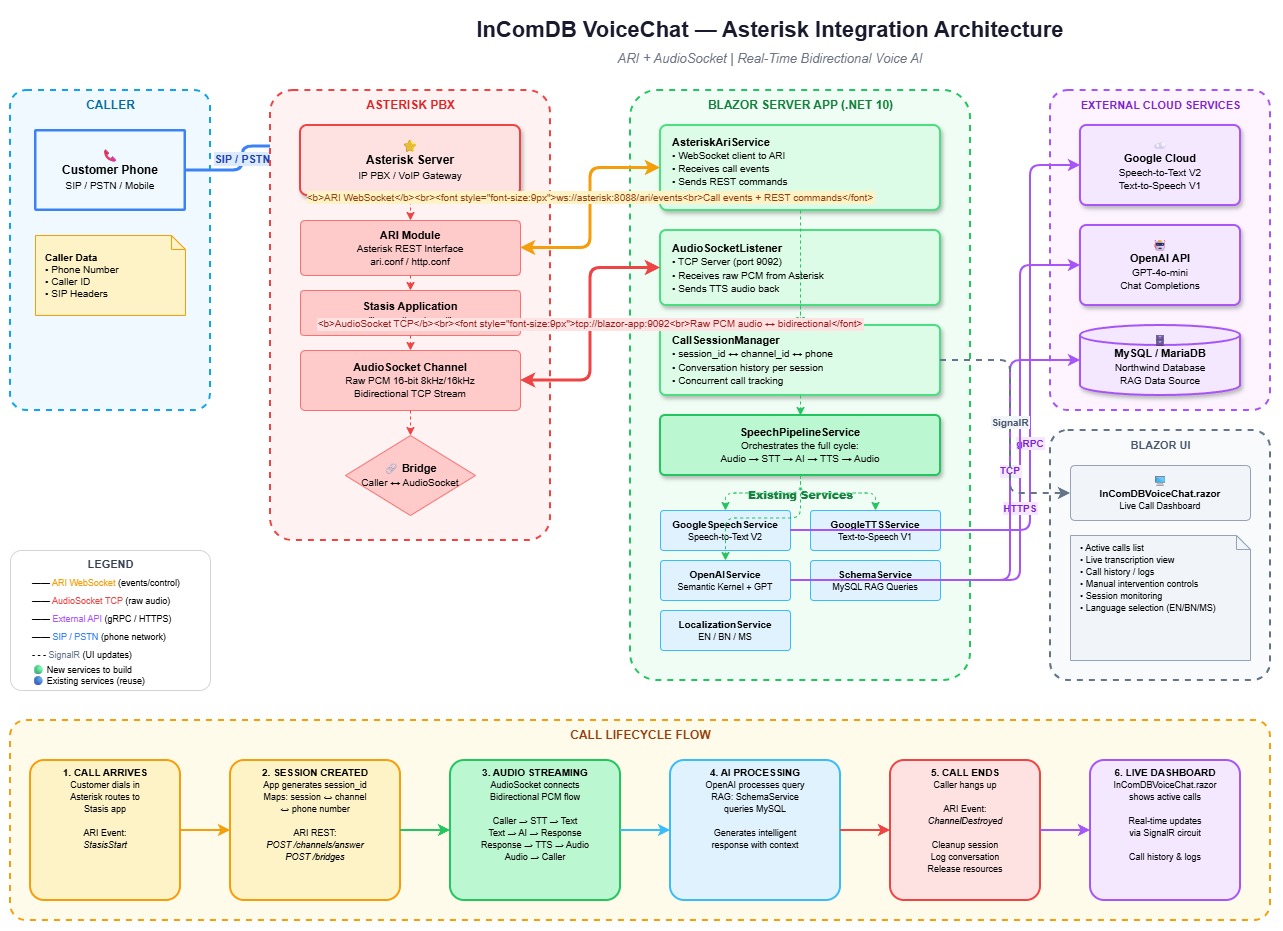
The diagram above shows all components and how they connect. Two parallel communication paths link the Asterisk PBX to the Blazor application: ARI (WebSocket + REST) for call control, and AudioSocket (raw TCP) for bidirectional audio streaming.
Two Communication Channels
| Channel | Protocol | Purpose | Port |
|---|---|---|---|
| ARI (Asterisk REST Interface) | WebSocket + REST HTTP | Call control — answer, bridge, hangup, events | 8088 |
| AudioSocket | Raw TCP | Bidirectional audio streaming — raw PCM voice data | 9092 |
2. Technology Stack
| Component | Technology | Version |
|---|---|---|
| Runtime | .NET | 10.0 |
| UI Framework | Blazor Server (Interactive SSR) | — |
| AI Engine | Microsoft Semantic Kernel + OpenAI | 1.67.1 |
| Speech-to-Text | Google Cloud Speech V2 | — |
| Text-to-Speech | Google Cloud TextToSpeech V1 | — |
| Database | MySQL/MariaDB via MySqlConnector | 2.5.0 |
| PBX | Asterisk PBX | 18+ (AudioSocket support) |
| Audio Protocol | AudioSocket (Asterisk-specific) | — |
| Call Control | ARI (Asterisk REST Interface) | — |
3. File Map
All files related to the Asterisk integration:
4. AudioSocket Protocol
AudioSocket is a lightweight TCP-based protocol created specifically for Asterisk. It is NOT a physical socket — it's a simple binary framing protocol for streaming raw audio over a standard TCP connection.
Frame Format
Every AudioSocket frame follows this structure:
┌──────────────┬────────────────────────┬──────────────────────┐
│  Type (1B)   │  Payload Length (3B)   │  Payload (N bytes)   │
│  0x00/10/01  │  Big-endian uint24     │  Raw data            │
└──────────────┴────────────────────────┴──────────────────────┘
Frame Types
| Type Byte | Name | Direction | Payload |
|---|---|---|---|
0x00 |
UUID | Asterisk → App | 36-byte ASCII UUID identifying the call channel |
0x10 |
Audio | Bidirectional | Raw PCM audio: signed linear 16-bit, 8kHz mono (slin16) |
0x01 |
Hangup | Asterisk → App | Empty (length = 0). Call has ended. |
0xFF |
Error | Either | Error description (rarely used) |
Audio Format
| Property | Value |
|---|---|
| Encoding | Signed Linear PCM (slin16) |
| Sample Rate | 8,000 Hz (8 kHz) |
| Bit Depth | 16-bit (2 bytes per sample) |
| Channels | Mono (1 channel) |
| Byte Rate | 16,000 bytes/second |
| Frame Size | Typically 320 bytes (20ms of audio) |
Reading Frames in C#
// Read the 4-byte header
var header = new byte[4];
await ReadExactAsync(stream, header, 0, 4, ct);

byte frameType = header[0];
int payloadLength = (header[1] << 16) | (header[2] << 8) | header[3];

// Read the payload
var payload = new byte[payloadLength];
if (payloadLength > 0)
    await ReadExactAsync(stream, payload, 0, payloadLength, ct);

switch (frameType)
{
    case 0x00: // UUID — identify the call
        var uuid = Encoding.ASCII.GetString(payload).Trim('\0');
        break;
    case 0x10: // Audio — raw PCM data
        ProcessAudioData(payload);
        break;
    case 0x01: // Hangup — call ended
        break;
}
Writing Frames in C#
// Build an audio response frame
var header = new byte[4];
header[0] = 0x10; // TypeAudio
header[1] = (byte)((audioData.Length >> 16) & 0xFF);
header[2] = (byte)((audioData.Length >> 8) & 0xFF);
header[3] = (byte)(audioData.Length & 0xFF);

await stream.WriteAsync(header, ct);
await stream.WriteAsync(audioData, ct);
await stream.FlushAsync(ct);
Silence Detection
// Check if a PCM frame is silent (all samples within ±200)
private static bool IsSilentFrame(byte[] frame)
{
    const short silenceThreshold = 200;
    for (int i = 0; i + 1 < frame.Length; i += 2)
    {
        var sample = (short)(frame[i] | (frame[i + 1] << 8));
        if (Math.Abs(sample) > silenceThreshold) return false;
    }
    return true;
}AudioBufferThreshold = 48000bytes = ~3 seconds of audio (8kHz × 2 bytes × 3s)SilenceFrameThreshold = 50frames = ~1.6 seconds of silence (at 320-byte frames)- Audio is processed when EITHER the buffer threshold is reached OR silence is detected after receiving audio
5. ARI (Asterisk REST Interface)
ARI provides two interfaces for call control:
5.1 WebSocket — Real-time Events
The AsteriskAriService connects to the ARI WebSocket to receive real-time call events.
Connection URL
ws://ASTERISK_HOST:8088/ari/events?api_key=USERNAME:PASSWORD&app=STASIS_APP_NAMEEvents We Handle
| Event | When | Action |
|---|---|---|
StasisStart |
New call enters our Stasis app | Create session → Answer → Create bridge → Create AudioSocket channel |
StasisEnd |
Call leaves our Stasis app | End session → Cleanup pipeline |
ChannelDestroyed |
Channel is destroyed | End session → Cleanup pipeline |
ChannelHangupRequest |
Caller hangs up | Delete bridge → End session → Hangup channel |
ChannelStateChange |
Channel state changes | Log only |
5.2 REST API — Call Control
ARI also provides a REST API (same host:port) for actively controlling calls. Authentication is HTTP Basic with the ARI username/password.
REST Calls We Make
| Method | Endpoint | Purpose |
|---|---|---|
POST |
/ari/channels/{id}/answer |
Answer an incoming call |
POST |
/ari/bridges?type=mixing |
Create a mixing bridge |
POST |
/ari/bridges/{id}/addChannel |
Add a channel to a bridge |
POST |
/ari/channels/externalMedia |
Create an AudioSocket external media channel |
DELETE |
/ari/channels/{id} |
Hang up a channel |
DELETE |
/ari/bridges/{id} |
Delete a bridge |
ExternalMedia Channel Creation (AudioSocket)
POST /ari/channels/externalMedia
    ?app=incomdb-voice-ai
    &external_host=127.0.0.1:9092
    &format=slin16
    &encapsulation=audiosocket
    &transport=tcp
    &connection_type=client
This tells Asterisk: "Create a channel that connects via TCP to our AudioSocket server at port 9092, sending/receiving audio in slin16 format using the AudioSocket protocol."
6. Speech Pipeline
The speech pipeline is the core processing engine. It takes raw PCM audio from the caller, converts it to text, processes through AI, and returns spoken audio.
Raw PCM Audio (8kHz slin16)
↓
Google Cloud Speech V2 (SpeechToTextAsync)
↓ transcript text
Semantic Kernel + OpenAI (ProcessTextAsync)
↓ AI response text [may invoke DB plugin via function calling]
Google Cloud TTS (TextToSpeechAsync)
↓
MP3 Audio Bytes
Per-Session Isolation
Each active call gets its own:
- Semantic Kernel instance — separate AI context
- ChatHistory — conversation memory isolated per call
- DB Plugin instance — database query tool for function calling
These are stored in ConcurrentDictionary<string, Kernel> and
ConcurrentDictionary<string, ChatHistory>, keyed by session ID.
AI Function Calling
The AI uses ToolCallBehavior.AutoInvokeKernelFunctions to automatically
call database query functions when needed. Two functions are registered:
| Function | Description | Use Case |
|---|---|---|
look_up_customer_info |
Query customer data from MySQL | "আমার বিল কত?" → Generates SQL → Queries DB → Returns results |
submit_complaint |
Insert a support ticket | "আমার ইন্টারনেট কাজ করছে না" → Inserts into ticket table |
7. Session Management
CallSession Model
public class CallSession
{
    public string SessionId { get; set; }     // Unique ID (GUID)
    public string ChannelId { get; set; }     // Asterisk channel ID
    public string CallerNumber { get; set; }  // Phone number
    public string BridgeId { get; set; }      // Asterisk bridge ID
    public CallState State { get; set; }      // Current state
    public DateTime StartTime { get; set; }
    public DateTime? EndTime { get; set; }
    public List<CallConversationTurn> Turns { get; set; }
    public string? LastTranscript { get; set; }
    public string? LastAiResponse { get; set; }
}
Call State Machine
Ringing → Answered → Streaming ⇆ Processing → Speaking → Streaming
                                                               ↓
Ended| State | Meaning |
|---|---|
Ringing | Call created, not yet answered |
Answered | Call answered by ARI, pipeline initializing |
Streaming | Listening to caller — receiving audio frames |
Processing | Audio sent to STT+AI — waiting for response |
Speaking | Playing TTS response audio back to caller |
Ended | Call terminated |
Error | An error occurred during the call |
Thread Safety
CallSessionManager uses ConcurrentDictionary for all session storage.
Two dictionaries are maintained:
_sessions— maps Session ID → CallSession_channelToSession— maps Asterisk Channel ID → Session ID
The OnSessionsChanged event is fired on every state change, allowing
the Blazor UI to update in real-time.
8. AudioSocketListener Service
Type: BackgroundService (hosted service)
File: Services/AudioSocketListener.cs
Port: Configured via AsteriskSettings.AudioSocketPort (default: 9092)
What It Does
- Starts a TCP listener on the configured port
- Accepts incoming connections from Asterisk (one per call)
- Reads the UUID frame to identify which session this connection belongs to
- Sends a greeting audio frame back immediately
- Reads audio frames, accumulates PCM data in a buffer
- When silence is detected OR buffer threshold is reached → sends to
SpeechPipelineService.ProcessAudioAsync() - Sends the response audio frame back to Asterisk
- On hangup frame → cleans up session
Connection Lifecycle
1. Asterisk opens TCP connection to our port 9092
2. Asterisk sends: [0x00][UUID] — identifies the call
3. We send: [0x10][greeting MP3] — greeting audio
4. Loop:
   a. Asterisk sends: [0x10][PCM audio frames]
   b. We accumulate until silence or threshold
   c. We process: PCM → STT → AI → TTS
   d. We send: [0x10][response MP3]
5. Asterisk sends: [0x01] — hangup
6. We cleanup and close connection
Concurrency
Each TCP connection is handled in a separate Task.Run(), so multiple
concurrent calls are supported. The ConcurrentDictionary in
CallSessionManager ensures thread-safe access to session data.
9. AsteriskAriService
Type: BackgroundService (hosted service)
File: Services/AsteriskAriService.cs
Also registered as: Singleton (for IsConnected property access)
What It Does
- Connects to the Asterisk ARI WebSocket
- Listens for call events (StasisStart, StasisEnd, etc.)
- On new call: creates session → answers → creates bridge → creates AudioSocket channel
- On hangup: cleans up bridge, session, and pipeline
- Auto-reconnects on connection failure (5-second delay)
StasisStart Handler — The Main Entry Point
private async Task HandleStasisStart(AriEvent ariEvent, CancellationToken ct)
{
    // 1. Create a session
    var session = _sessionManager.CreateSession(channelId, callerNumber);

    // 2. Initialize AI pipeline
    _pipeline.InitializeSession(session.SessionId, callerNumber);

    // 3. Answer the call
    await AnswerChannelAsync(channelId, ct);

    // 4. Create a mixing bridge
    var bridgeId = await CreateBridgeAsync(session.SessionId, ct);

    // 5. Add caller to bridge
    await AddChannelToBridgeAsync(bridgeId, channelId, ct);

    // 6. Create AudioSocket channel (connects to our TCP server)
    var audioSocketChannelId = await CreateAudioSocketChannelAsync(channelId, ct);

    // 7. Add AudioSocket channel to bridge
    await AddChannelToBridgeAsync(bridgeId, audioSocketChannelId, ct);

    // Now audio flows: Caller ↔ Bridge ↔ AudioSocket ↔ Our TCP Server
}mixing bridge with two channels:
- The caller's SIP/PSTN channel
- An AudioSocket externalMedia channel pointed at our TCP server
10. SpeechPipelineService
Type: Singleton
File: Services/SpeechPipelineService.cs
Public Methods
| Method | Input | Output | Description |
|---|---|---|---|
InitializeSession() |
sessionId, callerNumber | void | Creates Kernel + ChatHistory for a new call |
SpeechToTextAsync() |
byte[] pcmAudio | string transcript | PCM → Google Cloud Speech V2 → text |
ProcessTextAsync() |
sessionId, userText | string aiResponse | Text → Semantic Kernel + OpenAI → AI response |
TextToSpeechAsync() |
text, languageCode | byte[] mp3Audio | Text → Google Cloud TTS → MP3 bytes |
ProcessAudioAsync() |
sessionId, byte[] pcmAudio | byte[] mp3Audio | Full pipeline: STT → AI → TTS |
GetGreetingAudioAsync() |
sessionId | byte[] mp3Audio | Generates the welcome greeting audio |
CleanupSession() |
sessionId | void | Removes Kernel + ChatHistory from memory |
System Prompt
The AI is configured as an InComIT customer care representative. The system prompt:
- Sets the AI identity as InComIT service assistant
- Enforces Bengali language responses only
- Includes the caller's phone number for automatic lookup
- Instructs to use
look_up_customer_infoandsubmit_complainttools - Limits response length to 2-3 sentences (for phone TTS)
11. CallSessionManager
Type: Singleton
File: Services/CallSessionManager.cs
Key Methods
| Method | Description |
|---|---|
CreateSession(channelId, callerNumber) | Creates and stores a new CallSession |
GetSession(sessionId) | Retrieves session by ID |
GetSessionByChannel(channelId) | Looks up session by Asterisk channel ID |
UpdateSessionState(sessionId, state) | Changes state, fires OnSessionsChanged |
AddConversationTurn(sessionId, user, ai) | Adds a conversation turn |
EndSession(sessionId) | Marks ended, removes channel mapping |
GetActiveSessions() | Returns non-ended sessions (for UI) |
ActiveCallCount | Count of active calls (property) |
Events
// Subscribe to session changes in Blazor components:
SessionManager.OnSessionsChanged += () => InvokeAsync(StateHasChanged);
12. AsteriskDbQueryPlugin
File: Services/AsteriskDbQueryPlugin.cs
A Semantic Kernel plugin that allows the AI to query the IncomDB MySQL database during phone calls. It works through AI function calling — when the AI determines it needs customer data, it automatically invokes these functions.
How SQL Generation Works
- AI calls
look_up_customer_info("check bill for 01711234567") - Plugin sends the question + database schema to a separate OpenAI call
- OpenAI generates a SQL query (e.g.,
SELECT * FROM reign_invoice WHERE...) - Plugin validates the SQL (safety check — no DROP, ALTER, etc.)
- Plugin executes the SQL against MySQL
- Plugin formats results and returns to the AI
- AI uses the results to answer the caller in Bengali
- Use parameterized queries or a query builder
- Create a read-only MySQL user for the plugin
- Whitelist specific tables and columns
- Add query auditing/logging
13. REST API Endpoints
Base URL: /api/asterisk
File: Controllers/AsteriskController.cs
| Method | Endpoint | Description | Body |
|---|---|---|---|
POST |
/session/start |
Manually start a call session | { "phoneNumber": "017...", "channelId": "optional" } |
POST |
/session/end |
End a session | { "sessionId": "..." } |
POST |
/session/chat |
Send text to AI (testing without audio) | { "sessionId": "...", "text": "..." } |
GET |
/sessions/active |
List all active call sessions | — |
GET |
/sessions |
List all sessions (including ended) | — |
GET |
/session/{id} |
Get detailed session info with conversation | — |
GET |
/status |
ARI connection status + call counts | — |
Example: curl Testing
# Start a session
curl -X POST https://incom.zam.asia/api/asterisk/session/start \
  -H "Content-Type: application/json" \
  -d '{"phoneNumber":"01711234567"}'

# Chat with the AI
curl -X POST https://incom.zam.asia/api/asterisk/session/chat \
  -H "Content-Type: application/json" \
  -d '{"sessionId":"SESSION_ID_HERE","text":"আমার বিল কত?"}'

# Check status
curl https://incom.zam.asia/api/asterisk/status
14. Test Call Page
Route: /test-call
Files: AsteriskTestCall.razor + AsteriskTestCall.razor.cs
The test page simulates a phone call entirely in the browser, allowing you to test the full voice AI pipeline without Asterisk hardware.
Two Modes
| Mode | How It Works | Pipeline |
|---|---|---|
| 🌐 Browser STT | Uses the Web Speech API in the browser for speech recognition | Browser STT → ProcessTextAsync → Google TTS → Browser Audio |
| 🔌 AudioSocket | Captures raw PCM from mic, packages into AudioSocket frames, sends via WebSocket | Mic PCM → AudioSocket WS → Server STT → AI → TTS → AudioSocket WS → Speaker |
Test Page Features
- 📞 Call controls — start/end call with phone number and language selection
- 🎤 Voice input — speak naturally using your microphone
- ⌨️ Text input — type messages as alternative to voice
- 💬 Conversation panel — chat bubbles with timestamps
- 🔊 Audio playback — hear AI responses with replay button
- 📊 AudioSocket stats — frames/bytes sent/received, connection status
- 📜 Event log — real-time log of all operations
- ⏱️ Call timer — live duration counter
- 🎛️ Voice visualizer — animated bars showing listen/speak state
15. Call Monitor Panel
The main voice chat page (/ or /calls) includes a
slide-out call monitor panel that shows all active Asterisk calls in real-time.
Features
- ARI connection status indicator (green/red dot)
- Active call count
- Per-session details: caller number, state, duration, last transcript
- Auto-refresh via 2-second timer when monitor is open
- Real-time updates via
OnSessionsChangedevent
16. Installing Asterisk
Ubuntu/Debian
# Install Asterisk (Ubuntu 22.04+)
sudo apt update
sudo apt install -y asterisk

# Or build from source (for AudioSocket support — recommended)
cd /usr/src
sudo wget https://downloads.asterisk.org/pub/telephony/asterisk/asterisk-20-current.tar.gz
sudo tar xzf asterisk-20-current.tar.gz
cd asterisk-20.*/
sudo contrib/scripts/install_prereq install
sudo ./configure --with-jansson-bundled
sudo make menuselect  # Enable res_audiosocket and chan_audiosocket
sudo make -j$(nproc)
sudo make install
sudo make samples
sudo make configres_audiosocket and app_audiosocket
modules. These are available in Asterisk 16+ but may need to be explicitly enabled
during compilation (make menuselect).
Verify Installation
# Check Asterisk is running
sudo systemctl status asterisk

# Connect to Asterisk CLI
sudo asterisk -rvvv

# Verify AudioSocket module is loaded
CLI> module show like audiosocket
# Should show: res_audiosocket.so and app_audiosocket.so
17. Asterisk Configuration Files
17.1 ARI Configuration — /etc/asterisk/ari.conf
[general]
enabled = yes
pretty = yes
allowed_origins = *

[asterisk]
type = user
read_only = no
password = asterisk
17.2 HTTP Server — /etc/asterisk/http.conf
[general]
enabled = yes
bindaddr = 0.0.0.0
bindport = 8088

; For TLS (production):
; tlsenable = yes
; tlsbindaddr = 0.0.0.0:8089
; tlscertfile = /etc/asterisk/keys/asterisk.pem
; tlsprivatekey = /etc/asterisk/keys/asterisk.key
17.3 PJSIP Configuration — /etc/asterisk/pjsip.conf
; Transport for SIP
[transport-udp]
type = transport
protocol = udp
bind = 0.0.0.0:5060

; Example SIP trunk (adjust for your provider)
[trunk-provider]
type = endpoint
context = from-trunk
disallow = all
allow = ulaw
allow = alaw
direct_media = no
17.4 Modules — /etc/asterisk/modules.conf
[modules]
autoload = yes

; Ensure AudioSocket modules are loaded
load = res_audiosocket.so
load = app_audiosocket.so
load = res_ari.so
load = res_ari_channels.so
load = res_ari_bridges.so
load = res_stasis.so
load = res_http_websocket.so
18. Asterisk Dialplan
/etc/asterisk/extensions.conf
[from-trunk]
; Route incoming calls to our Stasis application
; When a call comes in, it enters the "incomdb-voice-ai" Stasis app
; which triggers a StasisStart event to our AsteriskAriService

exten => _X.,1,NoOp(Incoming call from ${CALLERID(num)} to ${EXTEN})
 same => n,Answer()
 same => n,Stasis(incomdb-voice-ai)
 same => n,Hangup()

; Alternative: Direct AudioSocket (without ARI bridge)
; This sends audio directly to our AudioSocket server
; exten => _X.,1,Answer()
; same => n,AudioSocket(127.0.0.1:9092,${CHANNEL(uniqueid)})
; same => n,Hangup()

[default]
exten => _X.,1,NoOp(Default context - routing to Stasis)
same => n,Goto(from-trunk,${EXTEN},1)- Stasis + ARI (recommended): The call enters
Stasis(incomdb-voice-ai), our AriService receives the event, creates a bridge, and connects an AudioSocket channel. This gives us full call control. - Direct AudioSocket: The
AudioSocket()dialplan application connects directly to our TCP server. Simpler but less control.
Reload After Changes
# In Asterisk CLI:
CLI> dialplan reload
CLI> module reload res_ari.so
CLI> ari show status
19. Application Configuration
appsettings.json — Asterisk Section
{
  "Asterisk": {
    "Host": "localhost",        // Asterisk server hostname/IP
    "AriPort": 8088,            // ARI HTTP/WebSocket port
    "AriUsername": "asterisk",   // ARI username (from ari.conf)
    "AriPassword": "asterisk",   // ARI password (from ari.conf)
    "StasisApp": "incomdb-voice-ai",  // Stasis application name
    "AudioSocketPort": 9092,    // Port for our AudioSocket TCP server
    "UseTls": false             // Use wss:// and https:// for ARI
  }
}
Other Required Configuration
{
  "GoogleCloud": {
    "ProjectId": "your-project-id",
    "CredentialsPath": "credentials/service-account.json"
  },
  "OpenAI": {
    "ApiKey": "sk-...",
    "Model": "gpt-4o",
    "MaxTokens": 8192,
    "Temperature": 0.7,
    "TimeoutSeconds": 180
  },
  "ConnectionStrings": {
    "IncomDatabase": "Server=...;Database=incomdb;..."
  }
}
Environment Variables
Google Cloud credentials can also be set via environment variable:
export GOOGLE_APPLICATION_CREDENTIALS="/path/to/credentials.json"20. Dependency Injection Registration
All Asterisk services are registered in Program.cs:
// === Asterisk Integration Services ===

// Configuration
builder.Services.Configure<AsteriskSettings>(
    builder.Configuration.GetSection("Asterisk"));

// Session tracking — singleton for cross-service access
builder.Services.AddSingleton<CallSessionManager>();

// Speech pipeline — singleton (manages per-session state internally)
builder.Services.AddSingleton<SpeechPipelineService>();

// ARI service — singleton + background service
builder.Services.AddSingleton<AsteriskAriService>();
builder.Services.AddHostedService(sp => sp.GetRequiredService<AsteriskAriService>());

// AudioSocket TCP listener — background service
builder.Services.AddHostedService<AudioSocketListener>();AddSingleton makes it injectable (e.g., in AsteriskController
to check IsConnected). AddHostedService using the
service provider ensures the same instance runs as a background service.
Service Lifecycle
| Service | Lifetime | Starts When |
|---|---|---|
| CallSessionManager | Singleton | First injection |
| SpeechPipelineService | Singleton | First injection |
| AsteriskAriService | Singleton + HostedService | App startup (auto) |
| AudioSocketListener | HostedService | App startup (auto) |
21. Complete Call Flow
Here's what happens step-by-step when a real phone call comes in:
Phase 1: Call Setup (ARI)
1. Customer dials the ISP phone number
2. SIP trunk delivers call to Asterisk
3. Dialplan routes to Stasis(incomdb-voice-ai)
4. ARI WebSocket sends StasisStart event to AsteriskAriService
5. AsteriskAriService.HandleStasisStart():
   a. Creates CallSession via SessionManager
   b. Initializes SpeechPipeline (Kernel + ChatHistory + DB Plugin)
   c. Answers the channel via ARI REST
   d. Creates a mixing bridge via ARI REST
   e. Adds caller channel to bridge
   f. Creates AudioSocket externalMedia channel → Asterisk connects to our TCP:9092
   g. Adds AudioSocket channel to bridge
   h. Audio now flows: Caller ↔ Bridge ↔ AudioSocket ↔ Our TCP Server
Phase 2: AudioSocket Connection
6. Asterisk opens TCP connection to AudioSocketListener on port 9092
7. Asterisk sends UUID frame [0x00][channelId]
8. AudioSocketListener looks up session by channelId
9. AudioSocketListener requests greeting audio from Pipeline
10. Greeting MP3 sent back as audio frame [0x10][mp3Data]
11. Customer hears: "আসসালামু আলাইকুম! InComIT Solution এ আপনাকে স্বাগতম..."
Phase 3: Conversation Loop
12. Customer speaks → Asterisk sends PCM audio frames [0x10][pcmData]
13. AudioSocketListener buffers PCM data
14. Silence detected (50 frames of silence OR 48KB buffer reached)
15. Pipeline.ProcessAudioAsync(sessionId, pcmData):
    a. SpeechToTextAsync → Google Cloud Speech V2 → "আমার বিল কত?"
    b. ProcessTextAsync → Semantic Kernel + OpenAI:
       - AI determines it needs customer data
       - AI calls look_up_customer_info("check bill for 01711234567")
       - Plugin generates SQL, queries MySQL, returns results
       - AI formulates response: "আপনার বিলের পরিমাণ ৫০০ টাকা..."
    c. TextToSpeechAsync → Google Cloud TTS → MP3 bytes
16. Response MP3 sent back as audio frame [0x10][mp3Data]
17. Customer hears the AI response
18. Repeat from step 12
Phase 4: Call End and Conversation Storage
19. Customer hangs up
20. Asterisk sends Hangup frame [0x01] to AudioSocket
21. ARI sends ChannelHangupRequest event
22. AsteriskAriService deletes bridge, hangs up channels
23. FinalizeAndCleanupSessionAsync() is called:
    a. Inserts conversation record into conversations table
    b. Inserts all message turns into conversation_messages table
    c. AI classifies the conversation:
       - Assigns category (Billing, Technical, General, etc.)
       - Assigns sub-category (Bill Inquiry, No Internet, etc.)
       - Generates Bengali + English summary
       - Determines resolution status
       - Analyzes customer sentiment
    d. Updates conversation record with classification
    e. Cleans up in-memory state (Kernel, ChatHistory)
24. SessionManager.EndSession() → marks session as Ended
25. TCP connection closes22. Troubleshooting
ARI Connection Fails
# Check Asterisk is running and HTTP is enabled
sudo asterisk -rvvv
CLI> http show status
CLI> ari show status

# Test ARI from command line
curl -u asterisk:asterisk http://ASTERISK_HOST:8088/ari/asterisk/info

# Check firewall
sudo ufw allow 8088/tcp
AudioSocket Connection Fails
# Check our TCP server is listening
netstat -tlnp | grep 9092

# Check Asterisk can reach our server
# From Asterisk host:
telnet BLAZOR_APP_HOST 9092

# Check AudioSocket module is loaded in Asterisk
CLI> module show like audiosocket

# Check firewall
sudo ufw allow 9092/tcp
No Audio / Empty Transcripts
- Verify Google Cloud credentials are valid and have Speech/TTS APIs enabled
- Check the audio format — Asterisk should send slin16 (8kHz, 16-bit, mono)
- Check the
AudioBufferThreshold— if too high, short phrases may not trigger processing - Check the
SilenceFrameThreshold— if too low, speech may be cut off - Look at server logs for STT errors
AI Not Calling Database Functions
- Verify
Data/incomdb_schema.txtexists and contains the database schema - Verify
IncomDatabaseconnection string is set in appsettings.json - Check that
ToolCallBehavior.AutoInvokeKernelFunctionsis set in ProcessTextAsync - Check OpenAI model supports function calling (gpt-4o, gpt-4-turbo, etc.)
Useful Log Filters
# In appsettings.json, enable detailed logging:
{
  "Logging": {
    "LogLevel": {
      "Default": "Information",
      "SpeechToTextWithGoogle.Services": "Debug"
    }
  }
}

# Key log messages to watch for:
"AudioSocket listener started on port {Port}"
"AudioSocket connection accepted from {Remote}"
"AudioSocket UUID received: {Uuid}"
"Processing {Bytes} bytes of audio for session {SessionId}"
"STT result: {Text}"
"AI response for session {SessionId}: {Response}"
"TTS generated {Bytes} bytes of audio"
"Connected to ARI WebSocket"
"New call: Channel={ChannelId}, Caller={CallerNumber}"
23. Known Issues & TODOs
Critical for Production
| Issue | Impact | Solution |
|---|---|---|
| 🔴 MP3→PCM transcoding missing | Google TTS returns MP3, but AudioSocket expects slin16 PCM. Audio won't play on real Asterisk. | Add transcoding in AudioSocketListener.SendAudioFrameAsync() using NAudio or FFmpeg.
Example: decode MP3 to PCM, resample to 8kHz, convert to 16-bit signed linear. |
| 🔴 SQL injection risk in DB Plugin | AI-generated SQL is executed directly. Malicious prompts could cause data issues. | Use parameterized queries, a read-only DB user, query auditing, and table whitelisting. |
| 🟡 No authentication on REST API | Anyone can start/end sessions via /api/asterisk/* |
Add API key authentication or JWT tokens. |
Improvements
| Enhancement | Description |
|---|---|
| Streaming STT | Use Google Cloud Speech streaming recognition instead of batch. Would reduce latency significantly — no need to buffer 3 seconds of audio. |
| Barge-in support | Allow caller to interrupt the AI while it's speaking. Would require cancelling TTS playback when new audio is detected. |
| Call recording | Save call audio and transcripts for quality monitoring. Could use Asterisk MixMonitor or capture at the AudioSocket level. |
| Multi-language detection | Auto-detect caller's language from first few seconds of speech. Google STT supports language hints. |
| Call transfer | Transfer to a human agent when AI can't handle the request. Use ARI to redirect the channel to a different extension. |
| Health checks | Add /health endpoint checking ARI connection, AudioSocket port,
Google Cloud credentials, and OpenAI API key. |
| Metrics/dashboard | Track call volume, average duration, STT accuracy, AI response time, TTS latency, and customer satisfaction. |
MP3→PCM Transcoding Example (TODO)
// Using NAudio (add NuGet package: NAudio)
private byte[] ConvertMp3ToPcm8kHz(byte[] mp3Data)
{
    using var mp3Stream = new MemoryStream(mp3Data);
    using var mp3Reader = new Mp3FileReader(mp3Stream);
    using var resampler = new MediaFoundationResampler(mp3Reader,
        new WaveFormat(8000, 16, 1)); // 8kHz, 16-bit, mono

    using var outputStream = new MemoryStream();
    var buffer = new byte[4096];
    int bytesRead;
    while ((bytesRead = resampler.Read(buffer, 0, buffer.Length)) > 0)
    {
        outputStream.Write(buffer, 0, bytesRead);
    }
    return outputStream.ToArray();
}
24. How the API Connects with the System
This is the most important section for understanding how Asterisk talks to the Blazor application. There are two parallel communication paths, plus a supplementary REST API for monitoring and testing.
Path 1: Call Control (ARI WebSocket + REST)
When the application starts, AsteriskAriService (a BackgroundService)
automatically opens a persistent WebSocket connection to the Asterisk server:
ws://ASTERISK_HOST:8088/ari/events?api_key=asterisk:asterisk&app=incomdb-voice-ai
This is configured in appsettings.json under the "Asterisk" section.
When a phone call arrives at Asterisk, the dialplan routes it to the Stasis app
incomdb-voice-ai, which sends a StasisStart event through
this WebSocket. The HandleStasisStart() method then:
- Creates a
CallSessionviaCallSessionManager - Calls
InitializeSessionAsyncwhich looks up the caller phone number inreign_usersand sets up the AI (Kernel + ChatHistory + DB plugin) - Answers the call via ARI REST:
POST /ari/channels/{id}/answer - Creates a mixing bridge:
POST /ari/bridges?type=mixing - Adds the caller channel to the bridge
- Creates an AudioSocket external media channel:
POST /ari/channels/externalMediapointing to127.0.0.1:9092 - Adds the AudioSocket channel to the bridge
All REST calls go to http://ASTERISK_HOST:8088/ari/... with HTTP Basic auth.
Path 2: Audio Streaming (AudioSocket TCP)
AudioSocketListener (another BackgroundService) runs a TCP server on port 9092.
After step 6 above, Asterisk opens a TCP connection to this port. The flow is:
- Asterisk sends a UUID frame
[0x00]identifying the call channel - App sends back a greeting audio frame
[0x10]-- the customer hears the welcome message - Loop: Asterisk sends PCM audio
[0x10]frames of the caller speaking. App buffers them, detects silence, runs STT then AI then TTS, and sends the response audio back as[0x10]frames - When the caller hangs up, Asterisk sends
[0x01]hangup frame. App callsFinalizeAndCleanupSessionAsyncwhich saves the conversation to the database
The REST API (AsteriskController) -- Monitoring and Testing
The AsteriskController at /api/asterisk/ is a supplementary layer.
It is NOT the main entry point for real Asterisk calls. Its purpose is:
| Endpoint | Purpose | When to use |
|---|---|---|
POST /session/start |
Manually create a session for testing | Testing without real Asterisk. Bypasses PBX, simulates a call. |
POST /session/chat |
Send text to the AI without audio | Testing the AI pipeline (STT bypassed, text goes directly to Semantic Kernel). |
POST /session/end |
Manually end a session | Cleanup after manual testing or force-ending a stuck session. |
GET /sessions/active |
List active calls | Operations dashboard. See what calls are in progress. |
GET /session/{id} |
Get session details with full conversation | Debugging a specific call. View all turns and timestamps. |
GET /status |
ARI connection status + call counts | Health monitoring. Check if ARI is connected. |
Connection Requirements
For this to work with a real Asterisk server:
| Requirement | Details | Config location |
|---|---|---|
| Asterisk ARI enabled | Port 8088 open, HTTP and WebSocket enabled | /etc/asterisk/ari.conf and http.conf |
| AudioSocket modules loaded | res_audiosocket.so and app_audiosocket.so |
/etc/asterisk/modules.conf |
| Blazor app reachable from Asterisk | Port 9092 TCP must be open from Asterisk to Blazor app | Firewall rules |
| Asterisk reachable from Blazor app | Port 8088 must be open from Blazor app to Asterisk | Firewall rules |
| Host configuration | Set Asterisk.Host to Asterisk server IP |
appsettings.json |
AsteriskAriService.CreateAudioSocketChannelAsync(), the
external_host parameter is set to 127.0.0.1:9092.
This means Asterisk and the Blazor app must run on the same machine.
If they are on different machines, update line 306 to use the Blazor app's
actual IP address that Asterisk can reach.
Connection Sequence Diagram
App Startup:
  AsteriskAriService ──WebSocket──▶ Asterisk:8088  (persistent connection)
  AudioSocketListener listens on TCP :9092         (waiting for connections)

Incoming Call:
  Phone ──SIP──▶ Asterisk
  Asterisk ──StasisStart──▶ AsteriskAriService      (via WebSocket)
  AsteriskAriService ──REST──▶ Asterisk:8088         (answer, bridge, externalMedia)
  Asterisk ──TCP──▶ AudioSocketListener:9092         (audio starts flowing)

Conversation:
  Caller audio ──TCP──▶ AudioSocketListener
  AudioSocketListener ──▶ Google STT ──▶ OpenAI ──▶ Google TTS
  Response audio ──TCP──▶ Asterisk ──▶ Caller

Hangup:
  Asterisk ──Hangup frame──▶ AudioSocketListener    (TCP)
  Asterisk ──HangupRequest──▶ AsteriskAriService     (WebSocket)
  FinalizeAndCleanupSessionAsync() saves conversation to DB
25. Conversation Storage
Every completed conversation is automatically saved to the database with AI-powered
classification. This happens in FinalizeAndCleanupSessionAsync when
the call ends.
Database Tables
| Table | Purpose |
|---|---|
conversation_categories |
6 top-level categories: Billing, Technical, Account, Package, Complaint, General |
conversation_sub_categories |
22 sub-categories under the main categories (e.g., Bill Inquiry, No Internet, Speed Issue) |
conversations |
One record per completed call. Stores session ID, caller info, category, summaries, sentiment, resolution status. |
conversation_messages |
Individual conversation turns (user speech and AI response, with timestamps). |
AI Classification Pipeline
When a call ends, ConversationStorageService.SaveConversationAsync() runs:
- Insert a new record in
conversationswith status "active" - Insert all message turns into
conversation_messages - Send the full conversation to OpenAI for classification. The AI returns:
- Category name (e.g., "Billing")
- Sub-category name (e.g., "Bill Inquiry")
- Bengali summary (for local staff)
- English summary (for management/reports)
- Resolution status: resolved, unresolved, escalated, or info_provided
- Customer sentiment: positive, neutral, negative, or frustrated
- Update the conversation record with the classification data and mark as "completed"
Key Files
| File | Role |
|---|---|
Services/ConversationStorageService.cs |
Orchestrates the save pipeline: insert, classify, update |
Models/ConversationModels.cs |
Entity classes: ConversationCategory, ConversationSubCategory, ConversationRecord, ConversationMessage, ConversationClassification |
Data/conversation_tables_migration.sql |
CREATE TABLE statements + seed data (6 categories, 22 sub-categories) + 4 views |
Database Views
Four convenience views are created by the migration:
| View | Shows |
|---|---|
v_conversations_with_categories | Conversations joined with category/sub-category names |
v_conversation_full | Full conversation detail including all message turns |
v_conversation_stats | Statistics: total count, avg turns, avg duration, per-category breakdown |
v_recent_conversations | Last 50 conversations for quick dashboard view |
📞 InComIT Solution — Voice AI Customer Support System
Built with .NET 10, Blazor Server, Semantic Kernel, Google Cloud, & Asterisk PBX
For questions, contact the development team or open an issue on
GitHub.